Training Centre

Get the training you need, when you need it.

Loan application training (Simpology V2)

Learn how to apply and lodge applications using Granite’s broker digital loan application platform, powered by Simpology V2 with Loanapp 2.0.

Training guides

Explore step-by-step training guides for the Granite Simpology Loanapp V2 experience.

SMSF Loan Applications

How to set up an SMSF application in Loanapp V2 

What is an SMSF Loan?

A Self-Managed Super Fund (SMSF) loan allows an SMSF to borrow funds to purchase an investment property through a Limited Recourse Borrowing Arrangement (LRBA).

Under an LRBA, the lender’s recourse is generally limited to the property held within the borrowing arrangement and does not extend to the SMSF’s other assets in the event of default.

Due to the legal structure required under superannuation legislation, SMSF applications involve multiple entities and a more complex applicant structure than a standard residential mortgage application. Correctly configuring these entities in Loanapp V2 is critical to ensure accurate lender assessment and successful application submission.

Understanding the Applicant Structure

A typical SMSF application in Loanapp V2 consists of the following entities:

Applicant Entity Type Role in Application
Pty Ltd Company (SMSF Trustee) Company Primary Borrower
SMSF Trust Trust Co-Borrower
Pty Ltd Company (Bare Trustee) Company Guarantor + Security Holder
Bare/Security/Custodian Trust Trust Guarantor
Individual Members (e.g. Mr & Mrs Smith) Person Guarantor/s

Step-by-Step: Entering the Application in Simpology V2 (Loanapp 2.0)

Follow each step in order. Do not skip ahead — the applicant structure must be complete before entering financial details.

Step Action Key Requirement
1 Enable SMSF Toggle In the Setup screen, toggle SMSF to YES before anything else
2 Add SMSF Trustee (Pty Ltd) Set as Primary Borrower
3 Add SMSF Trust Set as Co-Borrower
4 Add Bare Trustee (Pty Ltd) Set as Guarantor
5 Add Bare Trust Set as Guarantor
6 Add Individual Person(s) Individual SMSF members — set as Guarantors
7 Complete Entity Details Fill in all Company/Trust detail screens; link trustees to entities
8 Complete Personal Details Person Applicant and super contributions (not required for Easy Refi)
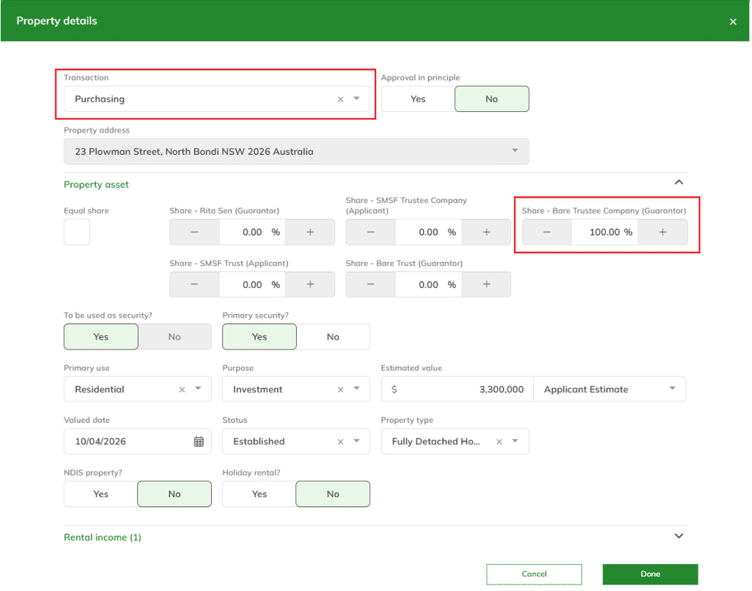
9 Add Security Property Ownership must be 100% to the Bare Trust Company
10 Confirm Loan Details Verify Primary Borrower (Pty Ltd) is listed as the Borrower

Step 1: Enable the SMSF Toggle

When creating a new application, you will first be presented with the Setup screen. This is where the high-level application details are configured, including the application title, loan amount, and anticipated settlement date.

⚠ Important: Toggle the SMSF question to YES before adding any applicants. This activates SMSF-specific fields and logic throughout the application.
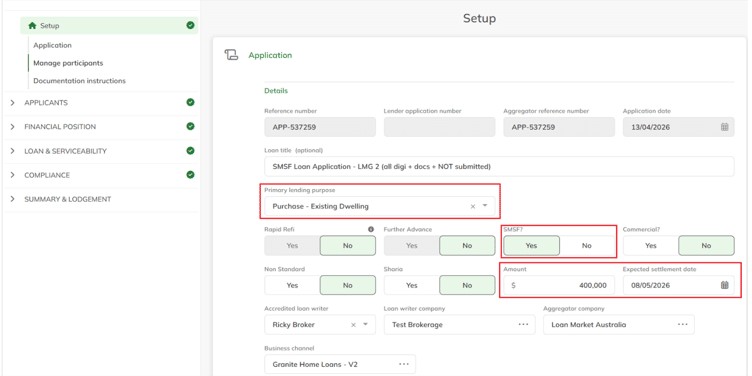
📷 Screenshot: Setup screen — SMSF toggle set to YES (Click image to enlarge)

Step 2: Add the Primary Borrower — Pty Ltd Company (SMSF Trustee)

The Primary Borrower is the Pty Ltd company that acts as Trustee for the SMSF.

  • Click Add Applicant and select Company
  • Enter the full registered company name
  • Set the borrower type to Primary Borrower

✓ Tip: You can use the company ABN Lookup feature – if this is the correct company, the lookup result will show it as an ATO Regulated SMSF — a useful confirmation you have the right entity.

Step 3: Add the Co-Borrower — SMSF Trust

The next applicant to be added is the SMSF Trust, which represents the superannuation fund itself.

  • Click Add Applicant and select Trust
  • Enter the SMSF entity name (e.g. “Smith Family Superannuation Fund”)
  • Set the borrower type to Co-applicant

Step 4: Add the Guarantor - Bare Trust Pty Ltd Company

The next applicant to be added is the Bare Trust Pty Ltd Company, which acts as the trustee of the Bare (Security/Custodian) Trust. This entity is responsible for legally holding the security property on behalf of the SMSF structure during the loan term.

  • Click Add Applicant and select Company
  • Enter the registered company name for the Bare Trust trustee
  • Set the borrower type to Guarantor

⚠ Security Property Ownership: This Bare Trust Pty Ltd company is the entity that will be set as the 100% owner of the security property in Step 9.

Step 5: Add the Guarantor — Bare/Security Trust

The Bare Trust (also referred to as the Security Trust or Custodian Trust) holds legal title to the property on behalf of the SMSF until the loan is fully repaid.

  • Click Add Applicant and select Trust
  • Enter the name of the Bare Trust entity
  • Set the borrower type to Guarantor

Step 6: Add the Person Guarantors (SMSF Members)

The individual members of the SMSF are added as personal guarantors for the loan. Depending on the SMSF structure, there may be one or multiple member guarantors.

  • Click Add Applicant and select Person Applicant
  • Enter full name of each member (more personal details at Step 7)
  • Set each person’s borrower type to Guarantor
  • Repeat for each member of the SMSF

Once all applicants have been added, your application structure screen should show all five parties listed. You are now ready to complete the detail for each entity.
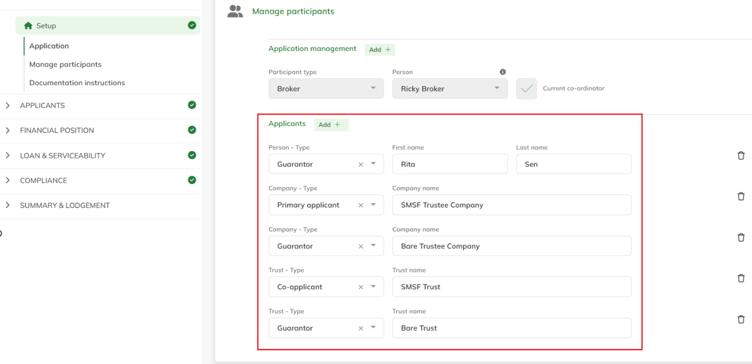
📷 Screenshot: Full applicant structure — all applicants listed (Click image to enlarge)

Step 7: Complete the Entity Details (Companies and Trusts)

You must complete the detail screens for each of the four entity applicants. Navigate to each entity in turn:

Primary Borrower Company (SMSF Trustee)
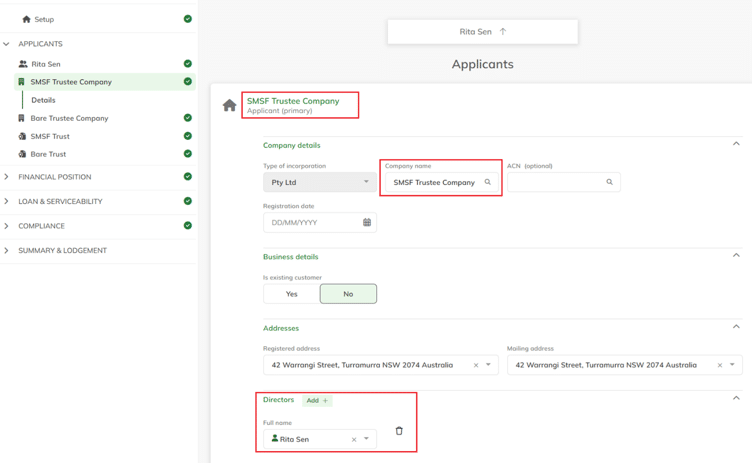
  • Complete the entity details for the trustee company
  • Add Directors (these should match your Person Applicant Guarantors)


📷 Screenshot: Primary Borrower company details screen with Directors/Shareholders
(Click image to enlarge)


SMSF Trust
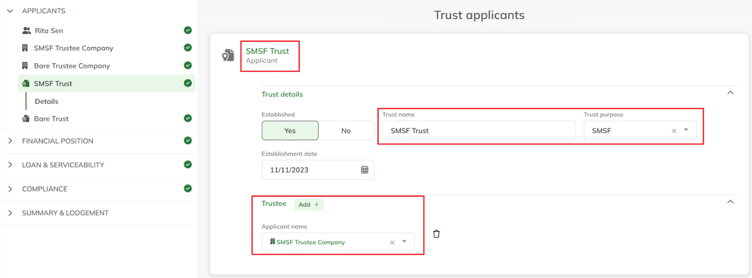
  • Enter trust details (including date established)
  • Select SMSF for Trust Purpose
  • Set the Trustee to the Primary Borrower Company

📷 Screenshot: SMSF Trust details screen — Trustee linked to Company, Beneficiaries listed (Click image to enlarge)


Bare Trustee (Guarantor)
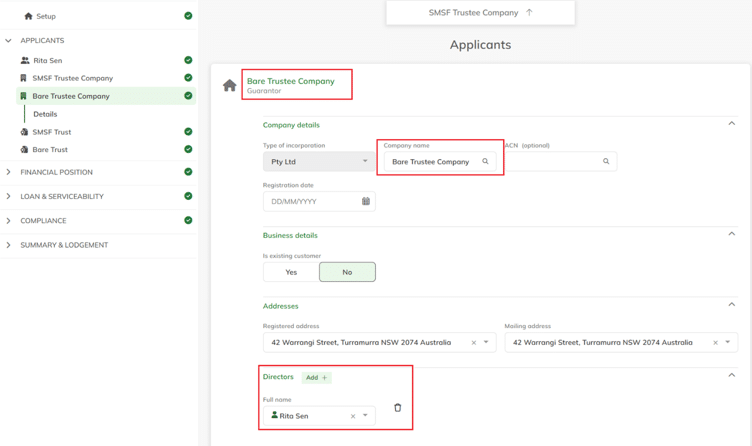
  • Find the trustee company with the use of ABN Lookup
  • Add Directors — these should match the Person Applicant Guarantors

📷 Screenshot: Bare Trust Company details screen with Directors/Shareholders
(Click image to enlarge)


Bare/Security/Custodian Trust (Guarantor)
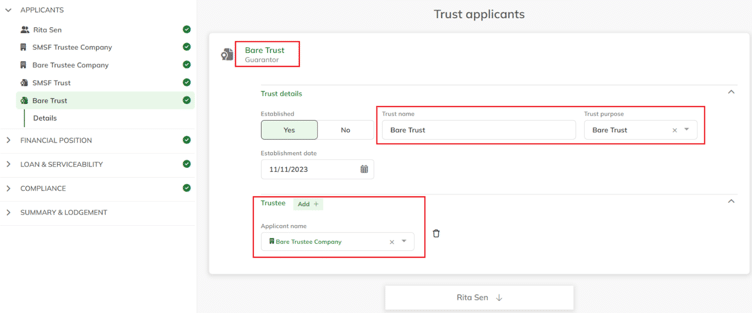
  • Enter trust details
  • Select Bare Trust for Trust Purpose
  • Set the Trustee to the Bare Trust Company (Guarantor company)

📷 Screenshot: Bare Trust details screen — Trustee linked to Bare Trust Company
(Click image to enlarge)


✓ Completion Check
When all entity detail screens are complete, the Applicants panel will display a green tick against each applicant. If any applicant still shows a warning icon, click into their screen to identify and complete the missing fields.
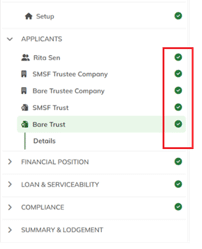
📷 Screenshot: All applicants with green completion ticks (Click image to enlarge)


Step 8: Complete Personal Details and Superannuation Contributions

Navigate to the Financial Position page for each applicant. The level of detail required varies by entity type:

Super Contributions (not required for Easy Refi)

For each Person Guarantor, you must enter the superannuation contributions being made to the SMSF (if applicable). This is entered in the Income section under Other Income:
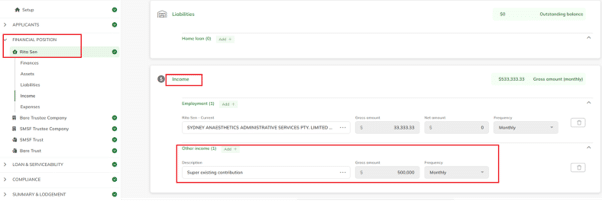
  1. Go to the Person Applicant’s Financial Position screen
  2. Navigate to the Income section
  3. Select Other Income
  4. Add Super Contributions with the annual contribution amount

📷 Screenshot: Income screen — Other Income section for super contributions
(Click image to enlarge)

Step 9: Add the Security Property

When entering the security property, ownership must be assigned to the Bare Trust Company — not the SMSF Trust or the individual guarantors.
  • Navigate to the Security section
  • Enter the property address and type
  • Set Ownership to the Guarantor Pty Ltd Company (Bare Trustee) at 100%
  • Add expected rental income if the property will be tenanted

📷 Screenshot: Security property screen — ownership set to Bare Trust Company at 100%
(Click image to enlarge)


Step 10: Confirm Loan Details and Borrower

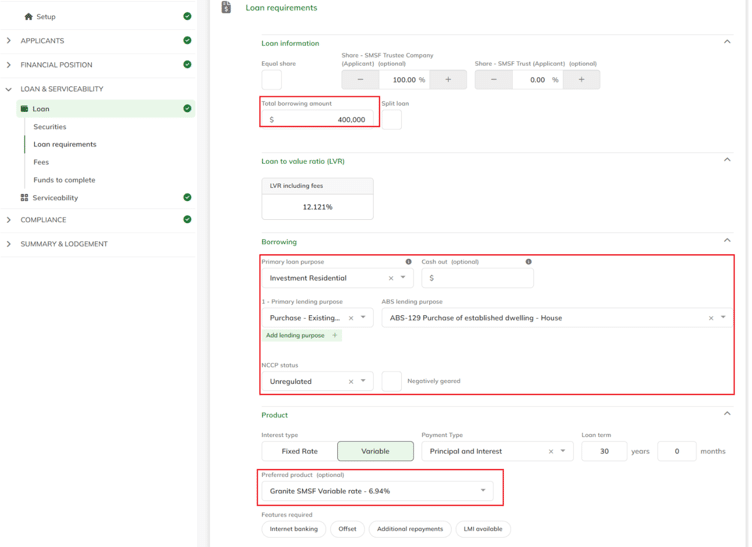
In the Loan Details section, confirm that the Primary Borrower (SMSF Trustee) is recorded as the Borrower for the application.
  • Navigate to Loan Details
  • Verify the Borrower field shows the Pty Ltd SMSF Trustee Company
  • Check product selection is SMSF-specific

📷 Screenshot: Loan Details screen — Primary Borrower Pty Ltd confirmed as Borrower
(Click image to enlarge)


Video training

Overview and introduction to Simpology V2.
Responding to my Info Requests in Simpology V2.
Click here to download the PDF guide.
Responding to info requests on behalf of someone else in Simpology V2
Simpology V2: Application Dashboard - Setting Columns.
Click here to download the PDF guide.
Simpology V2: Application Dashboard - Setting Filters.
Click here to download the PDF guide.

Troubleshooting: Common problems getting started with Simpology V2 (FAQs)

Loan application training (Simpology V1)

Entering SMSF Applications in Loanapp V1

An overview of SMSF structure (for LRBA and structure for LoanApp), step by step guide on how to enter into the system.

Conducted by Danielle from our Broker Support Team.

Need more info? Click here to find your Partnership Manager or Broker Support contacts.

How To respond to Lender’s Missing Information Requests (MIRs) in Loanapp V1

An overview of respond to missing information request via Simpology.

Conducted by Don from our Broker Support Team.

Need more info? Click here to find your Partnership Manager or Broker Support contacts.

Uploading Supporting Docs into Loanapp V1

An overview of how to upload supporting documents into Simpology.

Conducted by Don from our Broker Support Team.

Need more info? Click here to find your Partnership Manager or Broker Support contacts.

Product & Policy training

Key product policies

Employment Types

Pay As You Go (PAYG)

  1. The income individuals receive from salary and wages usually paid during the year under pay as you go (PAYG) and includes consumers working for a family business who are not defined as Self-Employed.
  2. PAYG employment types include:
    1. Permanent Full Time
    2. Permanent Part Time
    3. Casual; and
    4. Fixed term contract

Self Employed

  1. Self Employed is the term used for any consumer that works for themselves and is not employed by another party or if they receive more than 50% of their income (including wages) from a business in which they are the sole trader, a partner, director or shareholder and where they have management control of the company.
  2. Self-Employed consumers include:
    1. Sub-contractors; and
    2. Professional consultants.

Professional Self Employed

Professional Self Employed are consumers who are, but are not limited to,

  1. Lawyers,
  2. Certified Practicing Accountants,
  3. Dentists,
  4. Dental Specialists,
  5. Orthodontists,
  6. Obstetrician,
  7. Gynaecologist,
  8. General Practitioners,
  9. Hospital-employed Doctors,
  10. Medical Specialists,
  11. Anaesthetists,
  12. Paediatricians,
  13. Pathologists,
  14. Specialist Physicians,
  15. Psychiatrists,
  16. Veterinary Practitioners,
  17. Optometrists,
  18. Pharmacists,
  19. Chiropractors,
  20. Speech Therapists,
  21. Physiotherapists,
  22. Business Consultants and
  23. Information Technology Specialists.

Employment Requirements

The table below details acceptable employment history.

Type Requirements
Permanent full time
  • Minimum of 3 months in current employment
  • If in current employment < 3 months, must have been in continuous employment in similar industry or role for at least 12 months
Permanent Part Time
  • Minimum of 6 months in current employment
  • If in current employment < 6 months, must have been in continuous employment in similar industry or role for at least 12 months
Casual
  • Minimum of 6 months in current employment
  • If in current employment < 6 months, must have been in continuous employment in similar industry or role for at least 12 months
Contract
  • Minimum of 3 months in current employment
  • If in current employment < 3 months, must have been in continuous employment in similar industry or role for at least 12 months
  • Minimum 3 months remaining on contract term
Second Job
  • Minimum of 6 months in current employment
Self Employed
  • Minimum 24 months trading in the current business
 

Acceptable Income

Australian Income

The table below details the acceptable and unacceptable types of Australian Income:

Type Requirements
Salary and Wage
  • 100% of income for permanent employment
  • 100% of income for fixed term contracts with leave entitlements
  • 90% of income for casual employment
  • 90% of income for fixed term contracts without leave entitlements
Overtime and Allowances

Eligible Occupations1

  • 100% of overtime and allowances income from the most recent ATO Income Statement; or
  • 100% of overtime and allowances income evidenced by the actual year-to-date (YTD) amount on a June payslip of the most recent financial year; or
  • 100% of overtime and allowances income evidenced by the annualised year-to-date (YTD) amount on the most recent payslip

All Other Occupations

  • 100% of overtime and allowances income from the most recent ATO Income Statement; or
  • 100% of overtime and allowances income evidenced by the actual year-to-date (YTD) amount on a June payslip of the most recent financial year; or
  • 100% of overtime and allowances income evidenced by the actual year-to-date (YTD) amount on the most recent payslip; or
  • 100% of income evidenced by the annualised year-to-date (YTD) amount on the most recent payslip, where the YTD amount on the most recent payslip has a minimum of three months’ income, capped at 120% of the previous years’ overtime income
Bonuses and Commissions
  • 100% of bonus and commissions income evidenced from the most recent ATO Income Statement; or
  • 100% of bonus and commissions income evidenced by the actual year-to-date (YTD) amount on a June payslip of the most recent financial year; or
  • 100% of bonus and commissions income evidenced by the actual year-to-date (YTD) amount on the most recent payslip
  • If in current employment < 12 months, must have been in previous employment for at 12 months in similar industry or role
Salary Sacrifice
  • Where an employee voluntarily sacrifices a portion of their salary, 100% of the sacrifice can be added to the gross income
Salary Packaging
  • Where an employee is entitled to a component of their salary pre-tax (e.g., meal & entertainment card, mortgage payments etc.), 100% of the packaged amount can be included as non-taxable income
Novated Lease
  • 100% of the Novated Lease payments are deducted from the gross taxable income with the post tax running costs included as a commitment
Car Allowance
  • 100% of allowance can be included in gross taxable income
Fully maintained company car
  • Up to $5,000 can be included in gross taxable income or $3,500 to net income
Self Employed
  • Minimum 24 months trading in the current business
  • 100% of current year’s net profit
  • 100% of net operating income capped at 40% of gross revenue where the application is assessed based on 6 months Business Activity Statements and business bank account statements
Company Income
  • Minimum 24 months trading in the current business
  • 100% of current year’s net profit
Trust Distribution
  • 100% of gross trust distribution (net profit for trust) as personal income
Rental Income
  • 80% of gross rental income for residential investment properties
  • 80% of net rental income for commercial properties
  • 65% of gross rental income for Specialist Rental Accommodation (Co-Living, Student and Boarding House) properties
  • 65% of gross rental income for National Rental Affordability Scheme (NRAS) properties
  • 80% of gross rental income for Specialist Disability Accommodation (SDA) properties (0% allowed where property is also receiving NDIS Income)
  • 70% of gross rental income for Holiday accommodation properties averaged over the preceding 12 months
Investment Income
  • 80% of investment income (e.g. shares, dividends etc.)
  • Interest on deposits, that are being used as funds to complete, are not acceptable
  • Must be consistent over the 2 years
Australian Government Bond Income
  • 100% of Australian Government Bond income
Family Tax Benefit (as supporting income only)
  • 100% of income paid via the Family Assistance Office or the Australian Tax Office
  • Payment must be a Family Assistance payment (Part A and Part B only) made by the Federal Government
  • The dependent child/children must be less than 12 years of age
  • Combined Federal Government benefits cannot exceed 50% of the income required for servicing
Child Maintenance (as supporting income only)
  • 100% of income if child support agreement is registered with the Child Support Agency
  • 3 months bank statements confirming regular receipt of payments
  • Must have at least 5 years to expiry
Employer Maternity Leave Payment / Paid Parental Leave Payment
  • 50% of income of Employer Maternity Leave Payment and government Paid Parental Leave Payment (Working Parent Payment) is acceptable on the basis that this income is currently being paid and will continue to be paid until the consumer returns to work
Social Security Benefits & Government Pensions
  • 100% of income accepted where Granite considers the benefit to be a stable income source
  • Combined Federal Government benefits cannot exceed 50% of the income required for servicing
Income Protection & TPD Income
  • 100% of income accepted where Origin MMS considers the benefit to be a stable income source
Unemployment & Sickness Benefits
  • Unacceptable
Worker’s Compensation
  • Unacceptable
Income from Boarders
  • Unacceptable

1 Ambulance Officer, Police, Firefighter, Nurse, Midwife, Paramedic, Border Force, Protective Services Officer, Medical Practitioner Training, Anaesthetist, Dermatologist, Emergency Medical Specialist, Obstetrician, Gynaecologist, Ophthalmologist, Paediatrician, Pathologist, Specialist Physician, Psychiatrist, Radiologist, Nurse Educator, Nurse Researcher, Dentist, Dental Specialist, Hospital Pharmacist, Industrial Pharmacist, Retail Pharmacist, Occupational Therapist, Optometrist, Physiotherapist, Speech Pathologist, Chiropractor, Osteopath, Podiatrist, Medical Diagnostic Radiograph, Radiation Therapist, Nuclear Medicine Technologist, Sonographer, Veterinarian, Dietitian, Naturopath, Acupuncturist, Natural Therapy Professionals, Audiologist, Orthoptist, Orthodontist.


Foreign Income

The table details the acceptable types of foreign income:

Type Requirements
Salary or Wage
  • 80% of net foreign income converted to Australian dollars (using the average daily exchange rate over the past 30 days) if employment requirements are met evidenced by two recent consecutive payslips
  • 70% of net foreign income converted to Australian dollars (using the average daily exchange rate over the past 30 days) for fixed term contracts evidenced from employment contract or last 6 weeks bank statements
  • Casual employment income is unacceptable
Overtime
  • 80% of net foreign income converted to Australian dollars (using the average daily exchange rate over the past 30 days) evidenced by the annualised average of the last 3 months of consecutive payslips
Allowances
  • 80% of net foreign income converted to Australian dollars (using the average daily exchange rate over the past 30 days) evidenced by the annualised average of the last 3 months of consecutive payslips
Bonus / Commissions
  • 80% of net foreign income converted to Australian dollars (using the average daily exchange rate over the past 30 days) evidenced by the annualised average of the last 6 months of consecutive payslips
Self Employed
  • Minimum 24 months trading in the current business
  • 80% of current year’s net foreign income converted to Australian dollars (using the average daily exchange rate over the past 30 days) evidenced by a minimum of 6 months bank statements
Rental Income
  • 80% of net foreign income converted to Australian dollars (using the average daily exchange rate over the past 30 days) if evidenced by signed lease agreement and rental statement
Investment Income
  • 80% of net foreign income converted to Australian dollars (using the average daily exchange rate over the past 30 days) if evidenced by a minimum of 6 months bank statements or dividend notices

Acceptable Property Types

Acceptable Residential Property Types

Standard Commercial Properties are properties that are used for business purposes. This includes owner occupier, leased from related entity and tenanted properties.

The acceptable commercial property security types include:

  • Strata Offices & Showrooms (minimum area 30 m2);
  • Retail outlets (e.g. shops, restaurants);
  • Industrial Units/Factories (minimum area 30 m2);
  • Industrial Warehouses;
  • Mixed Residential & Commercial Use;
  • Residential Properties (≥ 4 or more on one title);
  • Industrial Workshops;
  • Medical/Dental Suites;
  • Childcare Centres;
  • Serviced Apartments;
  • Strata Retirement Units;
  • Function Halls; and
  • Lifestyle Farms;

Acceptable Commercial Property Types

Standard Commercial Properties are properties that are used for business purposes. This includes owner occupier, leased from related entity and tenanted properties.

The acceptable commercial property security types include:

  • Strata Offices & Showrooms (minimum area 30 m2);
  • Retail outlets (e.g. shops, restaurants);
  • Industrial Units/Factories (minimum area 30 m2);
  • Industrial Warehouses;
  • Mixed Residential & Commercial Use;
  • Residential Properties (≥ 4 or more on one title);
  • Industrial Workshops;
  • Medical/Dental Suites;
  • Childcare Centres;
  • Serviced Apartments;
  • Strata Retirement Units;
  • Function Halls; and
  • Lifestyle Farms;

Unacceptable Property Types

Unacceptable Residential Property Types

  • Abattoirs
  • Breweries
  • Brickworks
  • Brothels
  • Caravan Parks
  • Churches / Places of worship
  • Cinemas
  • Co-Living / Boarding Houses
  • Clubs
  • Farms
  • Foundries
  • Funeral
  • Gaming Centres
  • Golf Courses
  • Hotels and pubs
  • Hospitals
  • Marinas
  • Motels
  • Parlours
  • Petrol Stations
  • Recording/ Film studios
  • Rural Acre > 25 hectares
  • Schools
  • Student Accommodation
  • Quarries & mines
  • Gasworks
  • Sawmills
  • Sporting Centres
  • Swimming Pools
  • Theatres / Theme Parks
  • Tanneries
  • Vineyards / Wineries Stables

SMSF Lending Policy

SMSF actual and proposed contributions requirements

Access these policy changes, which came into effect on the 9 March 2026 

VOI and Easy Refinance Lending Policy

Digital VOI and Easy Refinance requirements

Access these policy changes, which came into effect on the 18 May 2026

Servicing calculators

Easy Refi SMSF Loan Servicing calculator

How to use the Granite Easy Refi SMSF Loan Servicing calculator

SMSF Loan Servicing calculator

How to use the Granite SMSF Loan Servicing calculator for purchases

Specialist Disability Accommodation Investment Guide

We have compiled a comprehensive guide on investing in NDIS housing, focusing specifically on Specialist Disability Accommodation (SDA). This guide outlines the key factors to consider when investing in SDA properties. It aims to help investors make informed decisions while contributing to the availability of high-quality and accessible housing for individuals with disabilities.

(Note: Home loans for SDA properties are not currently available through Granite.)

Download NDIS Information Guide